
Mugshot Reverse Image Search: Find Arrest Photos by Face
ProFaceFinder is a facial recognition search engine that finds publicly indexed mugshots, booking photos, and arrest records from a photo. Upload a face photo, selfie, or screenshot, and ProFaceFinder scans public web pages to locate matching face images when you do not know a person’s legal name.
FCRA Compliance Notice: ProFaceFinder is a public-web image search engine and is not a Consumer Reporting Agency under 15 U.S.C. § 1681. Search results cannot be used for employment decisions, tenant screening, credit underwriting, or insurance eligibility.
What Is ProFaceFinder Mugshot Reverse Image Search and Who Does It Serve?
ProFaceFinder is a web-based facial recognition search tool that locates publicly indexed booking photos, police press releases, and arrest news articles using a photograph instead of a person’s name.
Traditional public record directories, county sheriff portals, and court clerk databases require a person’s full legal name, age, and county jurisdiction to run a query. When you only have a photograph from an online profile, marketplace listing, or social account, text-based record databases cannot perform a search.
Common names also create ambiguity in text databases. Entering a common name into a statewide arrest directory returns hundreds of unverified records across multiple counties without confirming which record matches the person in your photo.
ProFaceFinder serves individuals who need to verify public web sources from an image, monitor their own online booking photo footprint, or identify the originating jurisdiction of a published photograph:
- Searches Without a Legal Name: ProFaceFinder accepts a face photo, selfie, or screenshot and searches public web pages without requiring a first name, last name, or date of birth.
- Matches Across Different Photos of the Same Face: ProFaceFinder measures 128 geometric facial landmarks, allowing the search engine to connect a casual portrait to a different booking photograph published on a public web page.
- Bypasses Spelling Errors and Aliases: Online blotters and third-party directories often contain clerical typos or nicknames. ProFaceFinder compares facial geometry rather than text strings.
- Identifies the Source Website and Jurisdiction: Unlocked search results provide direct links to the public web pages where matching images appear, allowing you to identify the relevant county or state for official court verification.
Name-Based Directories vs. ProFaceFinder Face Search
Name directories query text databases. The user must enter an accurate legal first name, last name, and state. Name directories cannot process photographs or identify individuals who use nicknames or aliases.
ProFaceFinder queries an image index of the public web. The user uploads a photo or screenshot, and the search engine locates visually similar faces across public arrest directories and news archives without needing a name.
How Does ProFaceFinder Compare to Google Lens, TinEye, and Public Record Directories?
ProFaceFinder, standard reverse image search engines (Google Lens and TinEye), and name-based data brokers (TruthFinder) use three distinct search technologies that produce different results.
| Search Attribute | ProFaceFinder Face Search | Google Lens / TinEye | TruthFinder / Name Directories |
|---|---|---|---|
| Primary Search Input | Face Photo, Selfie, or Screenshot | Image File or Direct Image URL | Legal First Name, Last Name, and State |
| Core Matching Method | 128-Point Facial Landmark Geometry (Vector Similarity) | Perceptual Pixel Hashing (pHash) and Object Classification | Text-Based Relational Database Queries |
| Finds Different Photos of the Same Face? | Yes (Compares facial structure across different photos) | No (Matches only identical or cropped copies of the same file) | No (Does not accept or analyze images) |
| Searches Without a Person’s Name? | Yes (Requires only a face image) | Yes (Visual file match only) | No (Requires an exact legal name) |
| Human Face Search Capability | Indexes Public Web Faces; Purges Probe Photos | Google Lens Suppresses Private Face Identification | No Visual Recognition Capability |
| Pricing and Billing Structure | One-Time Credits ($7.95 / $11.95) with Zero Subscriptions | Free General Web Utility | $28.00 to $35.00 Monthly Recurring Subscription |
| Result Output | Similarity Scores and Direct Source Webpage URLs | General Web Image Links | Compiled Text Dossiers |
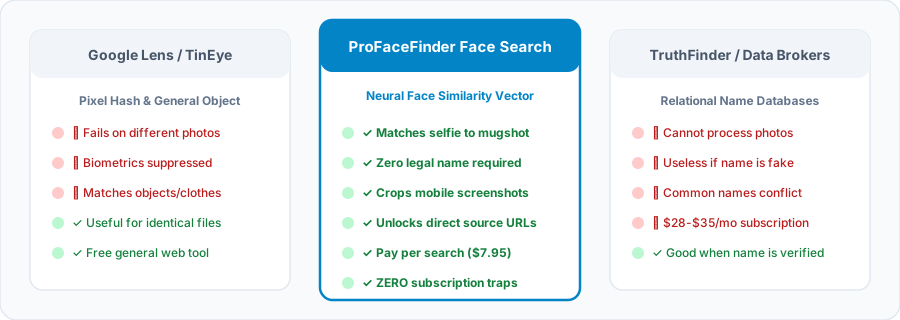
Why Google Lens and TinEye Do Not Find Mugshots from Selfies
- Google Lens Suppresses Human Face Matching: Google Lens identifies commercial products, landmarks, plants, and clothing. Google enforces product policies that disable facial recognition for private individuals, so uploading a selfie to Google Lens returns visually similar clothing or poses rather than matching the person’s face.
- TinEye Matches Only Identical Image Files: TinEye calculates a perceptual pixel hash of an uploaded image file to locate exact duplicates, resized copies, or crops of that specific file. Because a casual selfie and a police booking photograph are two separate camera files with different lighting and backgrounds, TinEye cannot connect them.
- ProFaceFinder Matches Facial Geometry Across Separate Photos: ProFaceFinder extracts facial landmark ratios, including interpupillary distance, nasal bridge proportion, and jawline contour. This geometric vector allows ProFaceFinder to locate public web pages where a different photograph of a similar face appears.
How Does ProFaceFinder Reverse Search a Mugshot by Photo?
ProFaceFinder executes a mugshot reverse image search in four technical steps using browser-based face detection and encrypted cloud vector comparison.
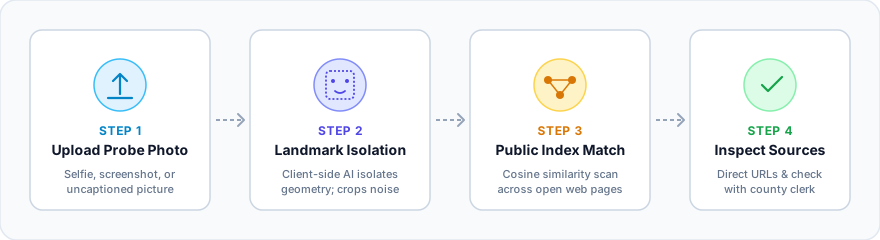
Upload a Face Photo or Screenshot
You select or drag a JPG, PNG, or WebP image (up to 6MB) into the ProFaceFinder upload box. The uploader accepts camera portraits, social profile pictures, and mobile screenshots.
Isolate Facial Landmarks in Browser
ProFaceFinder’s browser vision model detects the human face inside your image and places a normalized bounding box around the facial features. This step removes phone status bars, text captions, and background noise.
Compare Vectors Against Public Web
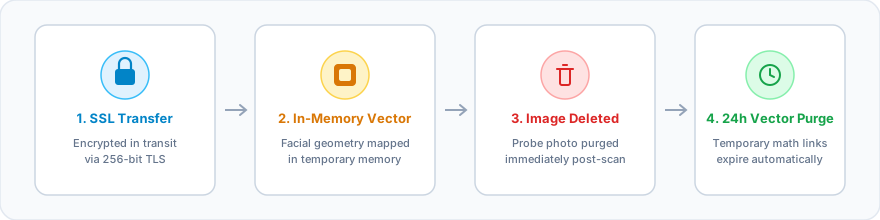
The server converts 128 facial landmarks into a non-reversible mathematical vector and immediately deletes your original photo. ProFaceFinder compares this vector against indexed public web pages, news archives, and public arrest directories.
Review Similarity Scores & URLs
ProFaceFinder displays a free match preview ranked by algorithmic visual similarity percentage. Applying a search credit unlocks unblurred thumbnails, domain names, and direct external URLs for independent verification.
What Photo Quality Produces the Most Accurate Face Search Results?
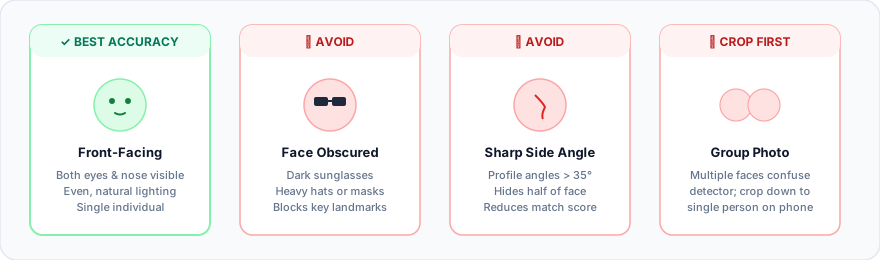
ProFaceFinder calculates facial geometry from visible anatomical landmarks. Follow four image preparation guidelines to maximize vector accuracy:
- Choose a Front-Facing Portrait: Select a photo where both eyes, the nose bridge, and the mouth are clearly visible. Head rotation exceeding 35 degrees hides key facial landmarks.
- Avoid Sunglasses and Face Coverings: Dark sunglasses, hats pulled low, masks, and heavy digital beauty filters block landmark detection.
- Crop Group Photos to One Person: When an image contains multiple people, crop the screenshot around the single face you want ProFaceFinder to search.
- Use Even Lighting and Clear Focus: Clear, well-lit facial features produce more reliable similarity scores than blurry or heavily shadowed images.
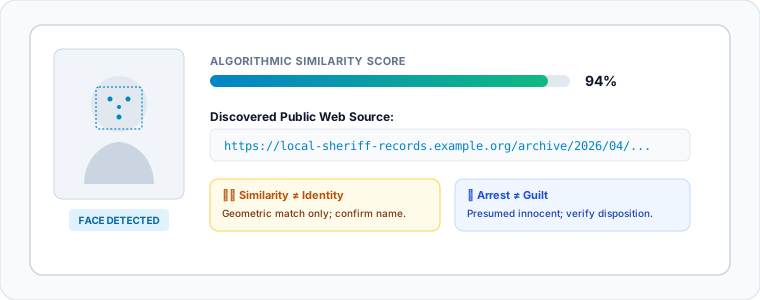
What Do ProFaceFinder Mugshot Search Results Mean? (Four Forensic Rules)
ProFaceFinder measures visual facial similarity across public web images; it does not verify legal identity or criminal history. Users must evaluate every search result using four forensic rules:
Visual Similarity ≠ Proof of Legal Identity
ProFaceFinder calculates mathematical resemblance between two facial images. A high similarity score (such as 90% or 95%) indicates strong geometric alignment, but a visual match does not prove that two photos show the same legal person. Lookalikes, relatives, and unrelated individuals often share similar facial proportions. Always verify a person’s full legal name, date of birth, and county jurisdiction through official court records.
Booking Photo ≠ Proof of Guilt
A booking photograph (mugshot) is an administrative intake image taken when a law enforcement agency processes an arrest. A booking photograph records that an arrest occurred at a specific date and time; it never proves criminal guilt. Under the United States Constitution and state laws, every arrested person is presumed innocent unless proven guilty in a court of law.
Arrest ≠ Conviction
Prosecutors and judges frequently drop, dismiss, or reduce criminal charges after an arrest takes place. Defendants may also be acquitted at trial or have their arrest records legally expunged or sealed. Third-party mugshot websites and news archives rarely update old pages when charges are dismissed, so a published mugshot never proves that a conviction occurred.
No Match ≠ Clean Record / Never Arrested
Zero matching results on ProFaceFinder do not prove that a person has never been arrested. More than 15 U.S. states (including California, New York, and New Jersey) restrict law enforcement agencies from publishing non-violent booking photos online, and many county jails store booking photos in offline systems that web search engines cannot index.
Which Public Web Sources Does ProFaceFinder Search vs. Closed Police Databases?
ProFaceFinder searches openly crawlable web pages on the public internet. ProFaceFinder is not affiliated with any government agency and does not connect to restricted law enforcement networks.
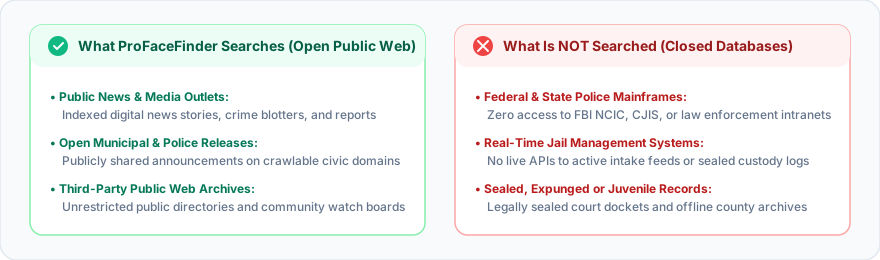
✓ Public Web Sources Indexed by ProFaceFinder
- Public News Articles and Crime Reports: Openly indexed local newspaper articles, broadcast news stories, and crime blotter reports published on public websites.
- Publicly Accessible Booking Directories: Third-party arrest archives and public record websites that allow search engine crawlers to index images without a login wall.
- Law Enforcement Press Releases: Official police department and sheriff press announcements published on public municipal web domains.
- Open Community and Watchdog Archives: Publicly visible forums, press archives, and open-web informational pages.
✗ Closed Systems Excluded from ProFaceFinder
- Closed Law Enforcement Databases: ProFaceFinder has zero access to the FBI National Crime Information Center (NCIC), CJIS, state police mainframes, or internal police dispatch systems.
- Internal County Jail Management Portals: ProFaceFinder does not connect to live county jail intake software or gated detention rosters protected by CAPTCHAs or login barriers.
- Private Social Media Accounts: ProFaceFinder cannot access locked, private, or friends-only profiles on Facebook, Instagram, TikTok, Snapchat, or LinkedIn.
- Juvenile, Sealed, or Expunged Court Files: Restricted juvenile records and sealed judicial files are never accessible to public web crawlers.
ProFaceFinder operates strictly as a visual search engine for publicly indexed web pages. ProFaceFinder does not generate, compile, or certify criminal history reports.
Where Can You Search Official Federal, State, and County Arrest Records for Free?
When you know a person’s full legal name and want to verify active custody status or official court records, federal, state, and county government agencies provide free public lookup portals:
Federal Bureau of Prisons (BOP)
The Federal Bureau of Prisons Inmate Locator searches federal inmate records from 1982 to the present by legal name or BOP Register Number, returning facility locations and projected release dates.
Scope Note: The BOP portal provides text custody records only and does not publish inmate mugshots online.
VINE (Victim Information & Notification)
VINElink tracks active inmate custody status and detention transfers across participating county jails and state Departments of Corrections in 48 U.S. states at zero cost to the public.
Scope Note: VINElink requires a person’s name or Offender ID number and does not support photo uploads.
National Sex Offender Public Website (NSOPW)
The U.S. Department of Justice operates NSOPW to connect state, territorial, and tribal sex offender registries into one free national search portal searchable by name or geographic address radius.
Scope Note: Official state registry entries display verified registration photos, physical descriptions, and conviction offenses.
Local County Sheriff & Court Clerk Portals
Local county sheriff offices process arrest bookings and maintain free online jail rosters, while County Clerks of Court maintain official criminal case dockets and final court dispositions.
Search Tip: Use ProFaceFinder to locate the source webpage of a photo first, note the county name, and then check that county’s official court docket.
How Do State Mugshot Laws and Free Removal Tools Protect Individuals?
Multiple U.S. states prohibit commercial websites from charging money to remove booking photos, and both Google and ProFaceFinder provide free removal tools for outdated or opted-out images.
State Statutes Banning Commercial “Pay-to-Remove” Practices
- Florida (Florida Statutes § 901.43): Florida Statutes § 901.43 prohibits any person or business from soliciting or accepting a fee to remove an arrest booking photograph. Commercial publishers must remove a booking photo free of charge within 10 days of receiving a written request, or face civil penalties of $1,000 per day.
- Georgia (O.C.G.A. § 35-4-5.2 & § 10-1-393.5): Georgia law prohibits commercial mugshot websites from charging removal fees when criminal charges were dismissed, dropped, acquitted, or restricted. Publishers must delete the record without charge within 30 days of receiving written notice.
- Texas (Texas Business & Commerce Code Chapter 109): Chapter 109 requires commercial criminal record publishers to verify record accuracy, prohibits charging fees to remove or correct expunged or nondisclosed records, and mandates removal within 30 days.
- California (AB 1475 & Civil Code § 1798.91.1): California Penal Code § 13665 (AB 1475) prohibits police agencies from sharing non-violent booking photos on social media, and California Civil Code § 1798.91.1 prohibits commercial websites from demanding money to remove booking photographs.
How to Remove Outdated or Expunged Mugshots Online
If a court dismissed, sealed, or expunged your arrest record, follow three steps to remove outdated mugshot links:
- Send a Written Removal Notice to the Host Website: Submit a written removal demand to the website hosting the image, citing the applicable state statute (such as Florida Statutes § 901.43) and attaching your court dismissal or expungement order.
- Submit the URL to Google’s Refresh Outdated Content Tool: Once the host website removes or updates the page, submit the URL to Google’s free Refresh Outdated Content Tool so Google purges the cached image thumbnail from search results.
- Submit a Free ProFaceFinder Opt-Out Request: To remove your facial vector from ProFaceFinder’s search index, submit a request on the ProFaceFinder Opt-Out Page. ProFaceFinder processes opt-out requests free of charge within 24 business hours. Removing an entry from ProFaceFinder stops it from appearing in ProFaceFinder searches, while the external host website controls the original web page.
How Much Does ProFaceFinder Cost? (Zero Recurring Subscriptions)
ProFaceFinder provides a free initial photo check and match preview. To unlock unblurred match thumbnails and direct source URLs, ProFaceFinder sells one-time search credit packages with zero monthly subscriptions and zero auto-renewing charges.
Pro Package
2 Face Searches ($3.98 per search)
- ✓ 2 Full Facial Recognition Web Searches
- ✓ Unblurred Match Thumbnails & Source URLs
- ✓ Visual Similarity Percentage Scores
- ✓ Accepts Photos, Selfies & Mobile Screenshots
- ✓ Search Credits Never Expire
- ✓ One-Time Payment (Never Auto-Renews)
Premium Package
5 Face Searches ($2.39 per search)
- ✓ 5 Full Facial Recognition Web Searches
- ✓ Unblurred Match Thumbnails & Source URLs
- ✓ Priority Vector Comparison Processing
- ✓ Visual Similarity Percentage Scores
- ✓ Search Credits Never Expire
- ✓ One-Time Payment (Never Auto-Renews)
Payment Security: ProFaceFinder processes standard credit and debit card payments through encrypted WooCommerce SSL checkout without requiring cryptocurrency or recurring memberships.
Frequently Asked Questions About ProFaceFinder Mugshot Reverse Image Search
Clear answers about how ProFaceFinder searches public web images, how to verify official court records, and how privacy protections work.
1. Does finding a mugshot online mean the person was convicted of a crime?
No. A booking photo (mugshot) records that a law enforcement agency arrested or booked an individual at a specific point in time. A mugshot does not prove criminal guilt or a criminal conviction. United States law presumes every person innocent until proven guilty in a court of law. Prosecutors and courts routinely drop, dismiss, or expunge criminal charges. Users must check official county court dockets to verify the final legal disposition of any case.
2. Can you reverse image search a mugshot using a selfie or mobile screenshot?
Yes. ProFaceFinder uses neural facial landmark detection rather than pixel matching. You can upload a front-facing selfie, a cropped mobile screenshot, or a social media portrait. ProFaceFinder detects the face in the image, maps 128 facial landmarks into a mathematical vector, and compares that vector against publicly indexed booking photos and arrest news articles.
3. Why doesn’t Google Lens find mugshots or arrest photos?
Google Lens uses general object classification and perceptual image hashing, and Google blocks facial recognition of private individuals. When a user uploads a face photo to Google Lens, Google Lens searches for similar clothing, hairstyles, or background objects. ProFaceFinder uses facial geometry recognition to match the same face across different photographs on the public web.
4. Why can’t I find someone’s mugshot online if I know they were arrested?
Zero search results do not mean an arrest never occurred. Three factors prevent a booking photo from appearing on the public web:
- State Non-Publication Laws: More than 15 states, including California (AB 1475), New York, and New Jersey, restrict police agencies from publishing non-violent booking photos online.
- Record Sealing and Expungement: Courts seal or expunge eligible arrest records, which removes them from public websites.
- Closed County Jail Systems: Many county sheriff offices store booking logs inside internal databases that block search engine crawlers.
5. Is ProFaceFinder an official criminal background check service?
No. ProFaceFinder is a public-web image search engine, not a Consumer Reporting Agency (CRA) under the Fair Credit Reporting Act (FCRA, 15 U.S.C. § 1681). ProFaceFinder does not compile certified criminal histories, pull court dockets, or issue consumer reports. Federal law prohibits using ProFaceFinder search results for employment decisions, tenant screening, credit underwriting, insurance eligibility, or professional licensing.
6. What happens to the photograph I upload? Is my probe image saved?
ProFaceFinder does not permanently store uploaded search photos. The server holds the uploaded image in temporary memory during facial landmark extraction and deletes the original photo immediately after generating the mathematical vector. Temporary search vectors and cached result links expire automatically after 24 hours. ProFaceFinder never adds uploaded user photos to its public search index.
7. What is the difference between ProFaceFinder and FaceCheck.ID or PimEyes?
ProFaceFinder, FaceCheck.ID, and PimEyes all use facial recognition, but each service uses a different payment model:
- FaceCheck.ID: Requires cryptocurrency payments (such as Bitcoin or Litecoin) and a higher minimum package.
- PimEyes: Requires a recurring monthly subscription starting at $29.99 per month.
- ProFaceFinder: Offers one-time credit packages ($7.95 for 2 searches and $11.95 for 5 searches) paid by standard credit or debit card with zero recurring subscriptions.
8. Can websites legally charge me money to remove my mugshot from the internet?
In many U.S. states, commercial websites cannot legally charge fees to remove booking photos. State statutes in Florida (F.S. § 901.43), Georgia (O.C.G.A. § 35-4-5.2), Texas (Business and Commerce Code Chapter 109), and California (Civil Code § 1798.91.1) prohibit pay-to-remove mugshot practices. These laws require commercial publishers to remove booking photos free of charge within 10 to 30 days after receiving proof of charge dismissal, acquittal, or expungement.
9. How do I independently verify if a search result belongs to the right person?
Follow four verification steps when ProFaceFinder returns a visually similar photo:
- Inspect the Source Domain: Check whether the link leads to an official municipal website, an established local news publisher, or an unverified third-party directory.
- Record the Jurisdiction and Date: Note the arresting agency, county name, and booking date listed on the source page.
- Search the County Clerk of Court: Enter the subject’s full legal name and date of birth into the official county court docket to verify case status and disposition.
- Check Official Custody Portals: Confirm active custody status on VINElink (
vinelink.com) or the Federal Bureau of Prisons locator (bop.gov).
10. Can I reverse search mugshots for individuals arrested outside the United States?
ProFaceFinder indexes public web pages worldwide, but public mugshot availability is primarily concentrated in the United States. Most countries outside the United States, including the United Kingdom, Canada, Australia, and European Union member states under GDPR, prohibit routine online publication of pretrial booking photos. Searches for individuals outside the United States primarily return public news articles, official press releases, or public law enforcement notices.
Fair Credit Reporting Act (FCRA) Notice and Permitted Use Policy
Non-Consumer Reporting Agency Notice (15 U.S.C. § 1681)
ProFaceFinder is not a Consumer Reporting Agency (CRA) as defined by the Fair Credit Reporting Act (15 U.S.C. § 1681 et seq.). ProFaceFinder does not compile, verify, or issue “consumer reports.” The visual search results and external web links returned by ProFaceFinder are provided solely for personal open-source image verification.
Strictly Prohibited Uses Under Federal Law: Federal law prohibits using ProFaceFinder or any information obtained through ProFaceFinder to determine an individual’s eligibility for:
- ✗ Employment Decisions: Evaluating job applicants, hiring, promotion, reassignment, or retention (employment screening).
- ✗ Residential Housing & Tenancy: Screening prospective tenants, approving lease agreements, or initiating evictions (tenant screening).
- ✗ Consumer Credit & Banking: Evaluating applications for personal loans, mortgages, credit cards, or financial accounts.
- ✗ Insurance Underwriting: Determining personal insurance eligibility, coverage limits, or premium rates.
- ✗ Professional & Government Licensing: Assessing applicants for occupational licenses, government benefits, or security clearances.
Using ProFaceFinder for any FCRA-regulated purpose violates our Terms of Service and may subject the user to civil liability and federal regulatory enforcement.
 EN
 DE
 ES
 PT
 RU
 JA
 ZH