

O ImgOps é prático, gratuito, simples e obtém rapidamente os seus resultados de Google, Bing, Yandex, TinEye, e outros motores de busca populares.
O problema é que... por vezes, faz-se tudo bem e mesmo assim não se obtêm resultados, não se tem acesso a determinadas ferramentas ou simplesmente não se está satisfeito.
Fiz algumas pesquisas, testes e posso dizer com toda a confiança que estes são os 5 alternativas mais semelhantes ao ImgOps:
1. ProFaceFinder - Melhor ferramenta para pesquisa de rostos
Se a tua cara está lá fora, ProFaceFinder vai encontrá-lo mesmo em sites de encontros ou em perfis aleatórios que nunca viu. Carregue uma fotografia e obtenha a imagem completa. Se alguém estiver a fingir ser você, saberá antes que as coisas fiquem complicadas.
ProFaceFinder é uma ferramenta de pesquisa inversa de imagens que se destaca por encontrar rostos e não apenas imagens semelhantes. Carregue uma fotografia e a ferramenta analisa várias fontes:
- Redes sociais
- Sites de encontros
- Sítios Web
- E ficheiros públicos de qualquer tipo
Funciona bem mesmo que a fotografia seja editado, cortado, ou retirado de um ângulo diferente, e detecta Gerado por IA ou Alterado pela IA imagens imediatamente.
Durante os testes, obtive 55 resultados em apenas alguns segundos. No entanto, o tempo depende da imagem que está a digitalizar, da sua popularidade e da profundidade ProFaceFinder tem de procurar.

Uma vez que o ProFaceFinder se concentra nos rostos, é muito mais provável que encontre a pessoa em causa, e não apenas sósias aleatórios.
O ProFaceFinder também mostra-lhe se as suas fotografias estão a ser utilizadas sem o seu consentimento, incluindo em cantos da Internet que preferimos não imaginar.
Os planos são económicos: $7.95 para 2 exames, ou $11,95 para 7. E a única coisa que não localiza são as suas chaves... aí está por sua conta.
2. SmallSEOTools - Mais semelhante ao ImgOps
O SmallSEOTools não é muito diferente do ImgOps, a não ser pelo facto de dar mais resultados, redireccionando-o para ferramentas de pesquisa inversa de imagens como:
- Reversely.ai
- Bing
- E Yandex, sem digitalizar as próprias fotografias.
No momento do teste, uma pesquisa em Reversely.ai obteve 20 resultados - 8 de alta precisão e 12 menos relevante, com fontes visíveis gratuitamente.
Pesquisas duplicadas devolvidas nenhum resultado, enquanto que o Pessoas caraterística encontrada 4 jogos fortes, mas o acesso exigia pagamento.
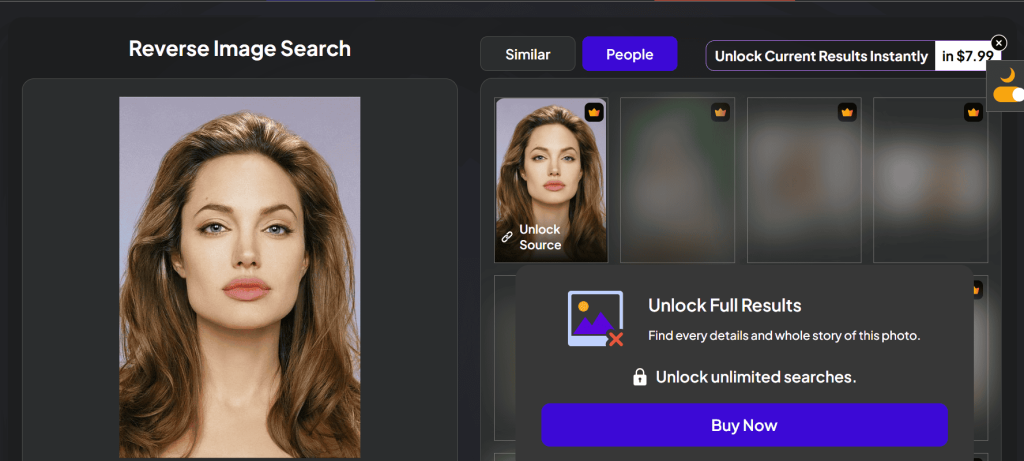
Estes resultados foram obtidos há meses. Desde então, a plataforma mudou. As pesquisas gratuitas já não estão disponíveis.
Agora só vê um resultado visível sem fontes, enquanto os restantes estão esbatidos e fechados atrás de um acesso pago:
O plano mensal custa $14.99 para 12-15 pesquisas, ou anualmente para $56. É necessário pagar um extra para ter acesso à fonte completa. Se quiser, pode criar um Personalizado plano de preços, também!
3. SearchEngineReports.net - Acesso gratuito e muitos resultados
SearchEngineReports.net é uma ferramenta simples de pesquisa de imagens que verifica vários motores de busca de uma só vez.
Carregue uma imagem, cole o seu URL ou utilize uma palavra-chave para obter uma imagem semelhante e será encaminhado para Google, Bing, Yandex, TinEye, Sogou, ou Baidu.
- O que faz do SearchEngineReports.net uma escolha sólida?
É rápido e fácil de utilizar para principiantes. É assim que se faz a pesquisa inversa de qualquer fotografia: carregar → pesquisar → deslizar → clicar em qualquer motor → rever resultados.
Foi concebido para pesquisas em vários motores - fornece diversos resultados sem esforço e de forma anónima. As suas fotografias são eliminadas imediatamente e nunca são armazenadas.
SearchEngineReports.net é muito semelhante ao ImgOps. Ambos são práticos na utilização diária e servem de “ponte” entre os utilizadores e os motores.
4. DupliChecker - Para resultados rápidos e básicos de pesquisa inversa de imagens
DupliChecker é uma alternativa sólida ao ImgOps que lhe permite efetuar pesquisas de imagens. Carregue um ficheiro (até 20MB), cole o URL de uma imagem ou introduza palavras-chave para começar.
Analisa Google, Bing, e Yandex imediatamente para confrontos faciais ou imagens semelhantes. O DupliChecker é não livre, e as subscrições são personalizável:
- $5.40/ semanalmente, 5 pesquisas
- $11.85 / mensal, 12 pesquisas
- $162.40 / anual, 200 pesquisas
As imagens não são guardadas, o que é bom quando se carregam fotografias pessoais - embora o ponto de interrogação levante uma sobrancelha.
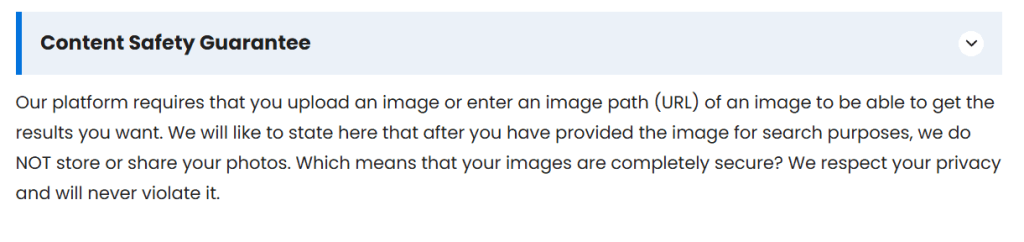
É mais simples do que o ImgOps porque não o redirecciona para outros sítios. É rápido e organiza os resultados num único local. Dito isto, não existem extras como dados EXIF, análise forense de imagens ou ferramentas avançadas.
5. Forense - Encontra fotografias semelhantes através da digitalização de píxeis
Forense é uma ferramenta baseada no browser que o ajuda a analisar fotografias para detetar sinais de edição ou adulteração, à semelhança de algumas das ferramentas que a ImgOps oferece.
Pode ser utilizado para:
- Aumentar o zoom e inspecionar os pormenores
- Detetar a clonagem, revelando áreas copiadas e coladas
- Analisar o ruído e ELA, destacando padrões que sugerem edições
- Verificar metadados e geotags incorporadas no ficheiro
Aqui está a distinção: O ImgOps funciona como um centro, permitindo-lhe escolher entre uma variedade de ferramentas de imagem online e outras plataformas. O Forensically é mais útil quando é necessário verificar se uma imagem foi manipulada.
Como escolher entre centros de pesquisa e ferramentas especializadas?
- Quando é que os centros de pesquisa de imagens são úteis?
Centros de pesquisa de imagens invertidas como ImgOps, DupliChecker, e outros funcionam como atalhos.
São óptimos quando se está a explorar, a comparar resultados ou a fazer verificações rápidas, mas não analisam as imagens propriamente ditas.
Em vez de passar a mesma imagem pelo Google, Bing ou Yandex, fornecem uma variedade de resultados e deixamos ao vosso critério a escolha do caminho a seguir.
- Quando utilizar ferramentas especializadas de pesquisa inversa de imagens?
Se pretende obter respostas reais, opte por ferramentas especializadas como ProFaceFinder. São a escolha inteligente, uma vez que foram especificamente concebidos para o reconhecimento facial.
É suficientemente poderoso para verificar a identidade de alguém identidade e verificar as correspondências faciais apenas através da fotografia, sem ter de passar por obstáculos.
 PT
PT  EN
EN  DE
DE  ES
ES  RU
RU  JA
JA  ZH
ZH
Deixe um comentário