

ImgOps удобен, бесплатен, прост и позволяет быстро получить результаты из Google, Bing, Yandex, TinEye, и другие популярные поисковые системы.
Проблема в том, что... иногда вы делаете все правильно, но все равно не получаете результатов, не имеете доступа к определенным инструментам или просто не удовлетворены.
Я провел исследование, тестирование и могу с полной уверенностью сказать, что это 5 наиболее похожих альтернатив ImgOps:
1. ProFaceFinder - Лучший инструмент для поиска лиц
Если ваше лицо будет на виду, ProFaceFinder вы найдете его даже на сайтах знакомств или в случайных анкетах, которые вы никогда не видели. Загрузите одну фотографию и получите полную картину. Если кто-то выдает себя за вас, вы узнаете об этом раньше, чем возникнут проблемы.
ProFaceFinder это инструмент обратного поиска изображений, позволяющий находить не просто похожие изображения, а лица. Загрузите фотографию, и он просканирует множество источников:
- Социальные сети
- Сайты знакомств
- Сайты
- И публичные файлы любого рода
Это хорошо работает, даже если фотография отредактировано, обрезано, или взяты из другой угол, и обнаруживает Созданный искусственным интеллектом или Измененный ИИ изображения немедленно.
Во время тестирования я получил 55 результатов всего за несколько секунд. Однако время зависит от сканируемого изображения, его популярности и глубины проникновения. ProFaceFinder нужно искать.

Поскольку ProFaceFinder фокусируется на лицах, вы с гораздо большей вероятностью найдете настоящего человека, а не просто случайные двойники.
ProFaceFinder также покажет вам, если Ваши фотографии используются без вашего согласия, В том числе и в таких уголках Интернета, о которых вы и мечтать не хотите.
Планы доступны по цене: $7.95 за 2 сканирования, или $11.95 за 7. И единственное, что он не найдет, - это ваши ключи... тут уж вы предоставлены сами себе.
2. SmallSEOTools - наиболее похожие на ImgOps
SmallSEOTools мало чем отличается от ImgOps, кроме того, что дает больше результатов, перенаправляя вас на такие инструменты обратного поиска изображений, как:
- Reversely.ai
- Бинг
- И Яндекс, не сканируя сами фотографии.
На момент тестирования поиск по Reversely.ai вернулось 20 результатов - 8 высокоточных и 12 менее актуальны, с видимыми источниками бесплатно.
Возвращение дублирующихся поисковых запросов нет результатов, в то время как Люди функция найдена 4 сильных матча, но для доступа к ним требовалась оплата.
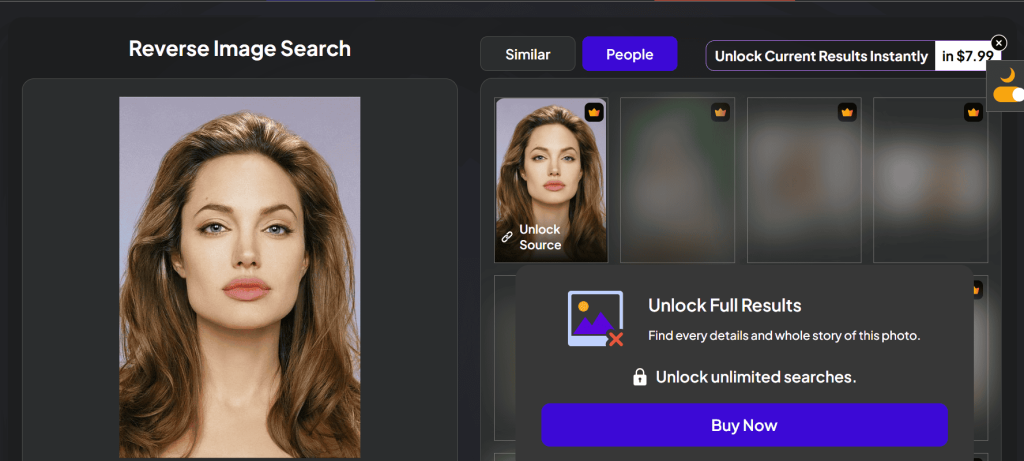
Эти результаты были получены несколько месяцев назад. С тех пор, платформа изменилась. Бесплатные поиски больше не доступны.
Теперь вы видите только один видимый результат без источников, а остальные размыты и закрыты за платной стеной:
Стоимость месячного плана $14.99 для 12-15 поиск, или ежегодно для $56. За полный доступ к исходникам нужно платить дополнительно. Если вы хотите, вы можете создать Пользовательское и ценовой план!
3. SearchEngineReports.net - бесплатный доступ и много результатов
SearchEngineReports.net это простой инструмент для поиска изображений, который проверяет несколько поисковых систем за один раз.
Загрузите изображение, вставьте его URL-адрес или используйте ключевое слово для поиска похожих изображений, и вы попадете на сайт Google, Бинг, Yandex, TinEye, Sogou, или Baidu.
- Что делает SearchEngineReports.net надежным выбором?
Это быстро и удобно для начинающих. Вот как выполнить обратный поиск любой фотографии: Загрузка → поиск → пролистывание → щелчок по любому движку → просмотр результатов.
Он создан для многопользовательского поиска - он предоставляет разнообразные результаты без усилий и анонимно. Ваши фотографии удаляются немедленно и никогда не хранятся.
SearchEngineReports.net очень похож на ImgOps. Они оба удобны в повседневном использовании и служат “мостиками” между пользователями и движками.
4. DupliChecker - для получения быстрых, базовых результатов обратного поиска изображений
DupliChecker это надежная альтернатива ImgOps, позволяющая выполнять поиск изображений. Загрузите файл (до 20 МБ), вставьте URL-адрес изображения или введите ключевые слова, чтобы начать работу.
Он сканирует Google, Bing, и Яндекс сразу для очные матчи или подобные изображения. DupliChecker - это не бесплатно, и подписки настраиваемый:
- $5.40/ еженедельно, 5 поиски
- $11.85 / ежемесячно, 12 поиски
- $162.40 / ежегодно, 200 поиски
Изображения не сохраняются, что удобно при загрузке личных фотографий, хотя этот знак вопроса заставляет задуматься.
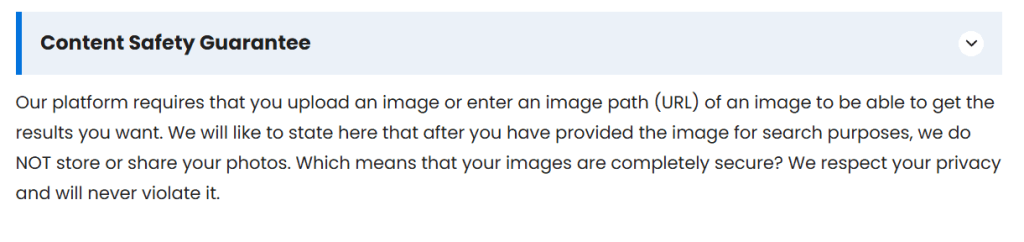
Он проще, чем ImgOps, потому что не перенаправляет вас на другие сайты. Это быстро и организует результаты в одном месте. При этом нет никаких дополнительных возможностей, таких как данные EXIF, экспертиза изображений или расширенные инструменты.
5. Криминалистика - поиск похожих фотографий путем сканирования пикселей
Криминалистика Это браузерный инструмент, который поможет вам проанализировать фотографии на наличие признаков редактирование или вскрытие, Аналогично некоторым инструментам, которые предлагает ImgOps.
Вы можете использовать его для:
- Увеличить и осмотреть мелкие детали
- Обнаружение клонирования, выявление скопированных участков
- Анализ шума и ELA, выделяя закономерности, которые позволяют внести правки
- Проверка метаданных и геотеги, встроенные в файл
Вот в чем разница: ImgOps выступает в роли концентратора, позволяя вам выбирать из множества онлайн-инструментов для работы с изображениями и других платформ. Forensically пригодится, если нужно проверить, не подвергалось ли изображение манипуляциям.
Как выбрать между поисковыми хабами и специализированными инструментами?
- Когда полезны узлы поиска изображений?
Такие центры обратного поиска изображений, как ImgOps, DupliChecker, и многое другое действуют как ярлыки.
Они отлично подходят для изучения, сравнения результатов или быстрой проверки, но они не анализируют сами изображения.
Вместо того чтобы прогонять одно и то же изображение через Google, Bing или Яндекс, они дают разнообразные результаты и предоставить вам самим выбирать, куда отправиться.
- Когда следует использовать специализированные инструменты для поиска обратных изображений?
Если вам нужны реальные ответы, обратитесь к специализированным инструментам, таким как ProFaceFinder. Это разумный выбор, поскольку они специально разработаны для распознавания лиц.
Он достаточно мощный, чтобы проверить чьи-то личность и проверять совпадения лиц только по их фотографии, без лишних хлопот.
 RU
RU  EN
EN  DE
DE  ES
ES  PT
PT  JA
JA  ZH
ZH
Добавить комментарий